
Many business owners have been in the same situation. You ask a salesperson whether the customer you discussed last month has replied, and the answer is that they will check. Two days later the answer still has not arrived, and when it does, it comes from one person's memory.
This article explains what the system called a CRM was built to solve, what it records that the older methods cannot, what it cannot do for you, and where an owner should begin. The closing section then covers Odoo CRM, the tool our company implements for its clients.
First, the terms. CRM stands for Customer Relationship Management, meaning a system for managing customer relationships. An opportunity means one record stating what you are trying to sell to whom, for how much, and when you expect to close it.
What the system was built to solve, and it is not about anyone's memory
In a business without a system, customer information has not gone anywhere. It is simply spread across places that are not connected: each salesperson's chat threads, personal notebooks, individual mailboxes, and spreadsheets each person built for themselves.
As long as everyone is still with you, this works. The problem appears at three moments. The first is when a salesperson resigns, and the relationships and negotiation history they accumulated leave with them. The second is when the owner has to estimate next quarter's revenue and has to assemble it from what each person says. The third is when an existing customer comes back and has to repeat their story, because whoever answered the phone is not the person who spoke to them last time.
A CRM was therefore not built to control salespeople. It was built to move information out of individuals and into the organization, which is a different thing entirely, and it is the point at which these projects most often fail, because the message to the sales team was wrong from the start.
What it records that a notebook and a spreadsheet cannot
The difference is not the number of fields. It is that the system also keeps what happened in sequence over time, rather than keeping only the latest status.
| What the system records | The owner's question it answers |
|---|---|
| Every contact, with its date and the person involved | When did we last speak to this customer, and about what |
| Where each customer came from | Which channel do the customers we actually win come from |
| The stage the opportunity is in | Where is most of our current work stuck |
| The value and the expected closing date | Roughly how much revenue should arrive next month |
| The reason a deal was not won | Did we lose on price, on the delivery date, or on something else |
The last row is the one most businesses skip, because recording a deal you did not win feels like recording a failure. Yet it is the only set of data that tells you whether to fix the price, the product, or the way you work.
The pipeline is the heart of it
A pipeline means dividing every open opportunity into stages by how far it has progressed, then seeing all of them at once on a single screen.
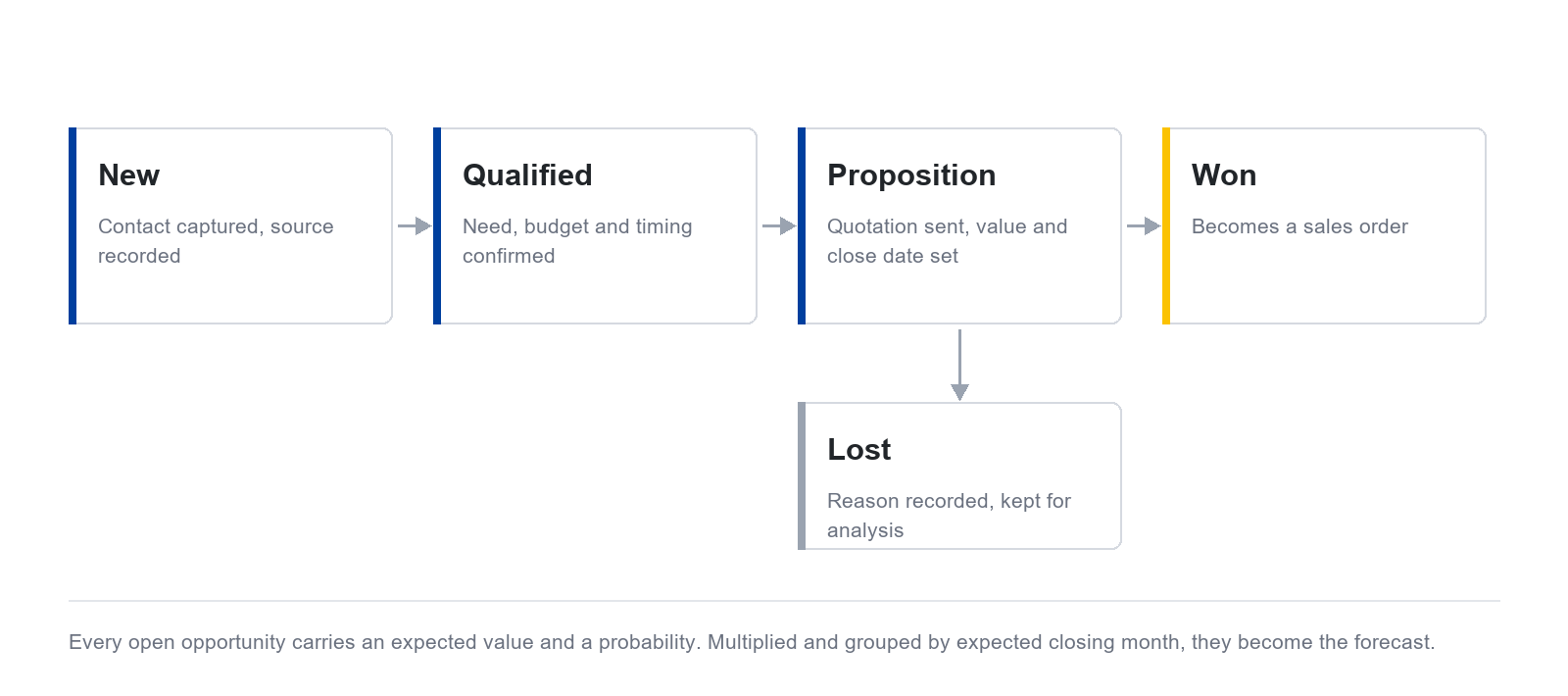
The benefit that usually goes unmentioned when the system is being sold is forecasting. Once every opportunity carries an expected value and a probability, the system calculates from those two figures and groups the result by the month the deal is expected to close. What you get is a revenue estimate with a traceable basis, rather than a figure that came from a feeling.
The caution is that the estimate is only as accurate as what was entered. If your salespeople record an optimistic probability on every deal, the resulting figure is optimistic in exactly the same proportion.
A pipeline forecast is not the same thing as a target
These two are commonly confused, but they are different sets of figures. A forecast answers what the work already in hand is likely to bring in. A target answers what you decided at the start of the year that it should bring in. A standard CRM answers the first one well, while comparing actual results against the targets you set is a separate matter, and usually has to be built, particularly when the targets need to reach customer and product level.
We have written that up separately, covering how far standard Odoo goes in setting targets, which part has to be built, and how many sets of data a target comparison needs. You can read it in the article on setting sales targets by customer and product in Odoo
What this system cannot do
If we wrote only about the benefits, this article would be no different from a sales document, which is not what we want to put in front of you. Three things have to be said plainly.
It does not increase sales on its own. It shows you which stage the work is stuck at, and which customers have been left alone too long. Following up is still a person's job.
It is of no use if the data going in is incomplete. A system holding half the information gives a more misleading picture than having no system, because the owner then decides from figures that look credible but are not complete.
It does not replace the relationship with the customer. It records what was discussed and when, but it does not make a customer trust you. That part remains between people, as it always was.
Where an owner should begin
The most common mistake is starting by designing every field anyone can think of, until the sales team cannot keep up and abandons it within two months. A safer order is to start small and add later.
- Set the pipeline stages to match how your business actually sells, rather than using the software's default stages
- Start with only the necessary fields: the customer, the value, the stage, the expected closing date, and the next activity
- Decide clearly who enters what and when, because that agreement matters more than the software does
- In the first month, measure the completeness of the data rather than the sales figures, because sales will not change in the first month
Once salespeople record updates routinely, add lead scoring, automatic assignment and more detailed reports.
So what does Odoo CRM do
Odoo is an enterprise resource planning system, or ERP, which keeps sales, accounting, and inventory work on a single set of records. Odoo CRM is the customer relationship part of that system.
According to Odoo's official documentation, this area is organized into five groups: organizing the pipeline, acquiring leads, assigning and tracking leads, analyzing performance, and optimizing day-to-day work. Between them they cover everything this article has described.
The clearest advantage of running a CRM inside the same ERP is that when a deal is won, that opportunity becomes a quotation and then an invoice on the same set of records. Nothing is copied between systems, and the figures the sales team and the accounting team look at are the same figures.
The limitation worth knowing is that the software's default stages rarely match how a given business actually sells, so they have to be adjusted before use. In the systems we implement for clients, we have built and put into production our own extension modules for exactly this: one that enforces the rules for moving between stages together with a window for recording won and lost outcomes, and one that adds the specific fields a particular client required.
The platform tools underneath, which comparisons usually overlook
When comparing software, people tend to look only at what the customer relationship part can do. Yet what actually decides whether the information ends up with the organization is the set of basic tools attached to every record in the system, not only to the customer relationship part.
By a record we mean the screen for one item of information, such as the screen for one customer, for one sales opportunity, or for one quotation.
| Tool | What it does |
|---|---|
| The chatter on each record | It sits on almost every record in the system, holding the messages sent out, internal notes visible only to staff, attached files, and the edit history the system logs by itself |
| Sending email to a customer from the record | It can be sent without opening a separate mail program, and the message is stored on that record rather than in an individual's own mailbox |
| Followers on a record | The creator and the assigned user are added as followers automatically, and they are notified when something changes |
| The next activity to be done | You set the type, the due date, and the person responsible. The built-in types are To-Do, Email, Call, Meeting, Document, Signature, and Grant Approval |
| Putting a meeting in the calendar | Choosing the Meeting activity type opens the user's calendar to schedule it, then creates the calendar event using the activity summary as its title |
| One place listing your own activities | Every outstanding activity can be seen from a single place, colour coded between overdue work, work due today, and work still ahead |
Return to the problem this article opened with, the answer that came from one person's memory. What actually fixes that is not a field on the opportunity screen. It is that the messages exchanged with the customer are held on that customer's record, and that there is always a next activity stating who has to do what by when. When that employee is away, whoever picks the work up can simply open it, without having to ask anyone.
Closing
If you still ask each salesperson for an estimate of next month’s revenue, consider organising those records in a CRM. Agree with sales staff what to record, who is responsible and when to update it.
DigitechX implements Odoo, develops extensions and connects existing systems. If you are unsure where CRM would help, describe your current sales process and the problems you encounter most often.