
Many business owners have had this happen. You send a proposal and hear nothing. When you follow up later, you learn that the client's procurement team looked your company up first and found nothing at all, or found a website last updated three years ago.
This article explains what a website actually does for a business that sells to organisations, where it adds value, the ways you can get one built, what the word hosting means, and which cost people underestimate until they have paid twice.
A B2B website does not do the same job as a shop
The misunderstanding that leads to the most wrong decisions is treating a company website as a place to sell. Corporate buyers almost never place an order from a website.
| A shop selling to consumers | A site for a business selling to organisations | |
|---|---|---|
| What visitors come to do | Decide and pay in a single visit | Check whether the supplier is real and knows its work |
| How it is measured | Sales made on the site | How many people get in touch, and the quality of what they ask |
| What matters most in the content | Product images and prices | Examples of work, how you work, and information that can be verified |
| Who decides | One person | Several people, and whoever opens the site is often not the one who approves |
That last row changes how the whole site should be written. Most people opening your site are gathering material to put in front of their own management. A good site therefore makes it easy for them to pass it on, rather than merely impressing them.
Where a website adds value
First, it removes repeat work from your sales team. The questions answered identically for every enquiry, such as scope, how you work, and what delivery looks like, belong on the site. Your salespeople then have time for the questions specific to each client, which only a person can answer.
Second, it gives the buyer material to argue your case internally. Your contact has to explain you to people who have never spoken to you. If they can send a link that explains it properly, their chances of getting through the internal process are better than if they retell it from memory.
Third, it lets prospects come to you. Most businesses selling to organisations rely on outbound calls and referrals, which work but are hard to scale. A site whose content matches what people actually search for brings enquiries in without you having to reach every one of them.
Fourth, it is an asset the company owns. Content on someone else's platform lives under that platform's rules, which change without your say. A site on your own domain stays with the company even when whoever maintains it changes.
The ways to get a website built
There are four main routes. They differ in who does the work, what shape the cost takes, and who keeps it alive after launch.
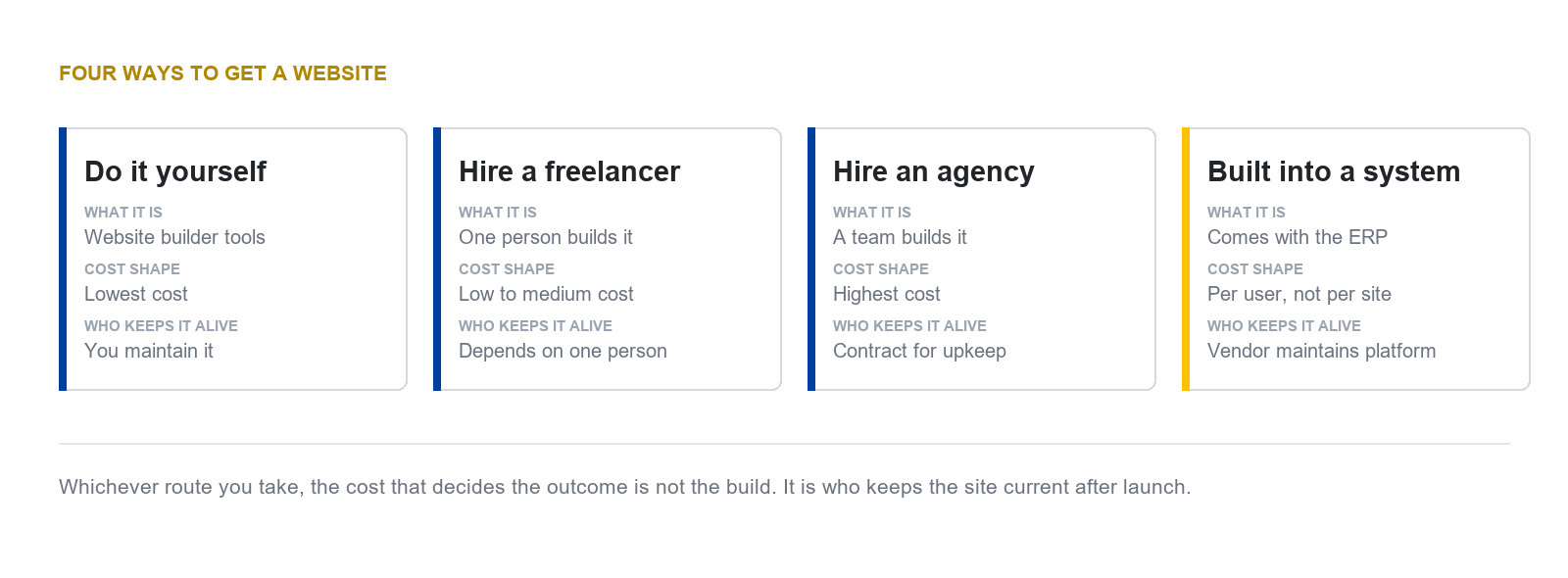
We do not quote a price range for any of these routes. We have not found a verifiable source for market rates in Thailand, and an out-of-date figure is more dangerous than no figure. What we can say honestly is that the shape of the cost differs. Some routes are paid once at build time, others monthly by number of users, and that difference matters more to a long-term budget than the starting price does.
What hosting is, and how it differs from a domain
These two terms get mixed up more than any others, but they are separate things bought separately.
| Term | What it is | Comparable to |
|---|---|---|
| Domain | The address of your site, such as your company name followed by a dot and an ending | The house number and nameplate |
| Hosting | The machine that stores the site's files and serves them to visitors at any hour | The land and the building |
| Security certificate | What makes the address begin with https and encrypts what is sent | A door that locks |
All three are needed before you have a working site. The question to put to every provider is who owns the domain, because if it is registered in the contractor's name, changing who maintains your site later becomes a negotiation rather than a notification.
The cost people underestimate
The cost that decides the outcome is not the build. It is the upkeep after launch. A site nobody maintains slowly becomes a site that gives wrong information, which is worse than having no site, because readers believe what they see.
We say this from our own experience. When we audited our own company site in August 2026, we found pages that were published and still carried the sample text that came with the template, including one page showing a fake address with the word Fake in it. We have fixed them, but we mention it because this happens to any site nobody reviews on a schedule, and it is not the fault of any particular tool.
Three things a website cannot do
If we wrote only about the benefits, this article would be no different from a sales document, which is not what we want to put in front of you.
It does not sell on its own. It makes it easier for someone already interested to decide to contact you. Closing is still a person's job.
A good-looking site is not the same as a site people find. Design work and search work are two different jobs, and they are often not in the same scope when you hire. Ask clearly at the start who is responsible for which.
No route survives without someone maintaining it. Whether you build it yourself, hire someone, or use a ready-made system, the outcome is the same if nobody is accountable for keeping the content current.
Closing
If your business is considering a new site or rebuilding the old one, the first question to answer is not which tool to use. It is who will look after the content after launch, and how often. Answering that will rule out most of the options that do not suit your organisation, without you having to compare them one by one.
The last of the four routes above is using the website that comes with an enterprise resource planning system, which carries advantages and limits quite different from the other three. We have written that up separately, together with security, backups, and moving away later. You can read it in the article on the website that comes with an ERP
DigitechX implements Odoo, develops extensions and connects existing systems. If you are choosing between a standalone website and one connected to your back office, tell us what you need now and what you plan to add later.