Some sites have submitted data; some sources are still missing
Check expected activities by site and month, with an identified owner. Distinguish missing submissions from activities with genuine zero use.
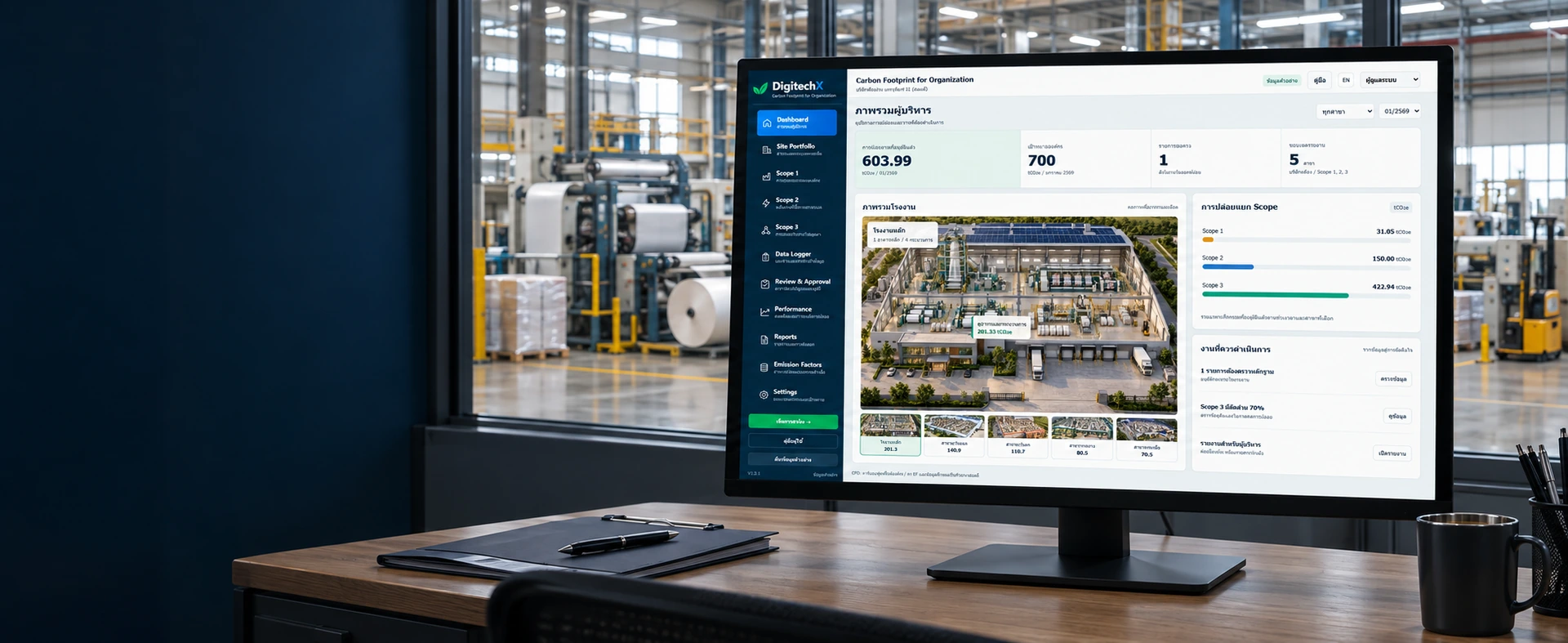
Carbon Footprint for Organization (CFO)
For people coordinating GHG inventories across manufacturing sites
Organize activity records and evidence by site, track missing sources and trace relevant Scope 1, 2 and 3 totals. Prepare an organizational inventory within an agreed reporting boundary.

This is a browser-based prototype with local changes, fictional data and emission factors, and simulated user roles. Reports have not been independently verified.
Sample application
Select a site and month in a fictional five-site packaging company. Inspect data gaps, enter and submit records for review, then open the reporting package to check boundaries and unresolved issues.
Check expected activities by site and month, with an identified owner. Distinguish missing submissions from activities with genuine zero use.
Keep quantities, units, document references, evidence and calculation factors with each record so reviewers can trace the inputs.
Review data coverage alongside internal approval status and reasons for exclusions before using the consolidated total in a report.
Organizational carbon inventory workflow
Define the boundary, assign data owners and review the inventory before reporting.
ERP and IoT are optional data sources. Integration scope must be agreed separately.
Identify the organization, sites and emission sources included.
Specify the data needed and who provides it for each source.
Record quantities, units, dates and supporting documents.
Link activity data to formulas and emission factor sources.
Check completeness, then approve or return records for correction.
Bring calculations and evidence together for external verification.
EF means emission factor per unit of activity. This diagram describes a workflow; it does not guarantee verification outcomes.
DATA TRACEABILITY
One record shows why quantity, units, reporting period and the emission factor must be checked together before consolidation.
Fictional demo example, not a customer result or an official emission factor.
The result, 50,000 kgCO₂e, converts to 50.000 tCO₂e. Approving this record does not establish that the reporting period is complete.
Traceable data matters regardless of how it reaches the system. Choose collection methods by emission source, frequency and organizational readiness.
Use energy bills, fuel logs, waste weigh tickets and procurement records. Identify the source, unit, period and data owner. The demo supports manual entry, CSV import and evidence attachments.
Available in the demoAssess data from ERP, accounting, procurement, logistics or suppliers. Agree data mapping, import frequency and duplicate checks before implementing a connection.
Assess and implement per projectAssess electricity or fuel inputs from metering systems. Define checks for periods, coverage and duplicate counting before implementing the connection. IoT is not required to start CFO accounting.
Optional; implemented per projectStart with organizational activities and reporting objectives, then select suitable methods and evidence. Sample data in each scope do not establish coverage of every factory emission source.
Examples include fuel used by equipment or vehicles within the organizational boundary and refrigerant leakage. Identify actual sources and activity data.
Examples include purchased electricity, steam, heat and cooling. The demo uses location-based reporting with fictional factors.
Screen 15 categories for relevance, significance and reasons. The demo calculates selected sample activities, not every method in every category.
Before deployment, DigitechX will assess required data, responsibilities, review steps and reporting outputs to define a system and development scope that can be tested.
Use the site list, activity sources, sample files and reporting objective to identify existing data and collection gaps.
Agree the shared database, access permissions, evidence storage and backup, import methods and necessary integrations.
Check calculations, applicable factors, boundaries, coverage and exports with the responsible staff. Define independent verification separately from system implementation.
ERP/IoT connections, a shared database and real user authentication are not part of the current demo. They require assessment and implementation within the project scope.
No. Start with activity records and evidence such as bills, documents and CSV files. If particular sources need frequent collection or substantial repeated work, assess existing-system or device integration against its value and cost.
Identify sources within the boundary, such as energy, fuel, refrigerants, transport or waste, then assign the actual owner of each source. Inventory coordination and review may be separate responsibilities; department names need not be the same across factories.
Not necessarily. Check the expected sources, sites and reporting periods as well. A source with no submission must remain visible as outstanding or have an appropriate documented exclusion reason.
No. It supports data preparation and internal review. Inventory methods, consulting and independent verification must be defined for the intended purpose and applicable criteria. Approving records or exporting a report is not TGO certification.
Not automatically. An internal organizational indicator does not replace a product-level study, reporting for goods covered by CBAM or a carbon-credit process. These have distinct boundaries, methods and requirements.
Prepare the number of sites, reporting periods, data-source list, sample files, involved roles and required outputs. Data preparation, configuration, integrations and any additional services can then be assessed as separate items.
Bring your site list, sample files and reporting objective to DigitechX to define data collection, review steps and an implementation scope appropriate to your organization.