Skip to Content
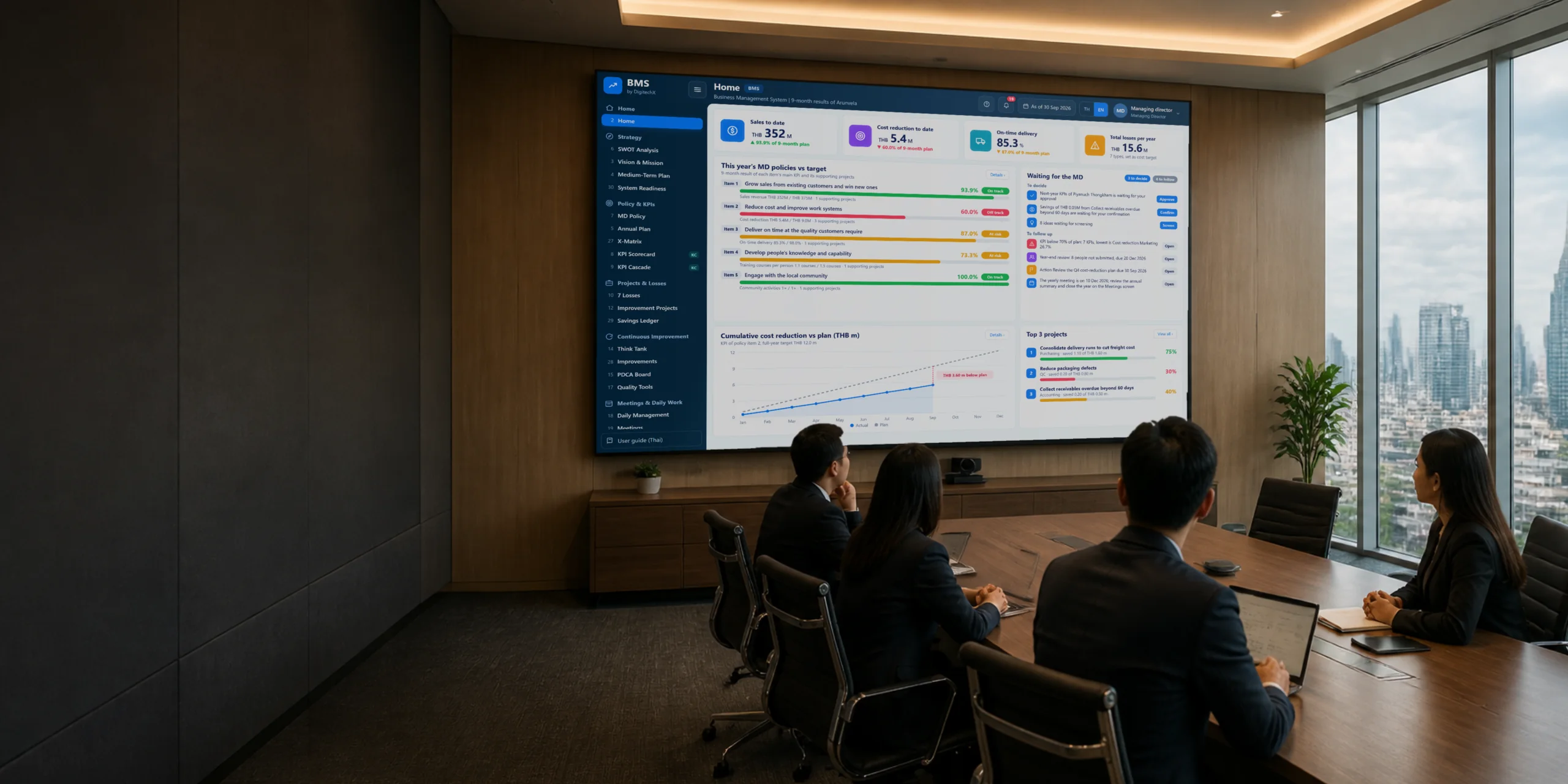
Executive home screen in the BMS demo system, showing cumulative results, policy vs. targets and key projects

Business Management System (BMS)

For executives and department managers who set and track annual targets

Manage company-wide annual targetsSee each month which targets are off plan

The managing director's policy is deployed as KPIs for departments, sections and individuals. KPI owners record actual results every month, and the system shows which projects support each target and who is responsible.

Policy and KPIsImprovement projectsMeetings and daily work
Click the image to open the demo system full screen

The demo system uses data from a fictitious company. Changes are stored only in this browser and are not connected to any other system.

Demo system

Try the real BMS

Open the demo system and press the green Start demo button. The system walks you through each step with real roles. Choose from 6 topics, from first-time setup to year-end close.

First-time setup to annual plan · Target deployment and catchball
Monthly results · From waste to improvement projects
Daily work and meetings · Evaluation and year-end close

Problems executives face

Targets are set every year, but by year-end no one knows where they were missed

These problems don't sink a company in a day, but they hold back growth every year they are left alone. Count how many your organization has.

01

Executives have to chase everything themselves

If the MD doesn't ask, no one reports, and decisions pile up on one desk

Holds back growthThe company grows only as far as one MD can keep up
02

The policy is announced, but never reaches employees

Employees don't know which company target their daily work supports

Holds back growthEveryone works hard, but the effort does not go to the targets set
03

Every department is busy, but company targets don't move

Each department runs its own projects, and no one sees which policy they link to

Holds back growthBudget and people go to projects that do not move the targets
04

Monthly meetings, but decisions are not based on numbers

Time goes to listening to reports, and items below plan never get discussed

Holds back growthProblems are found a month late, every cycle
05

Every department says it cut costs, but no one can trace it

No one can say where reported savings came from or who verified them

Holds back growthNext investments are decided on uncertain numbers
06

Improvements soon slip back to the old way

Fixes that work are not written into standards, so when people change, the work goes back to the old way

Holds back growthPaying to fix the same problems every year
07

Employee ideas go unanswered

Suggestions get no answer, so people stop suggesting

Holds back growthLosing ideas from the people who know the work best
08

The company has grown, but it is still managed like a small one

More people and more departments, each meeting and reporting in its own way

Holds back growthThe bigger the company, the slower it gets and the more it depends on a few people
09

After evaluation, no one knows what to develop

Evaluations end with a grade, not the gaps to close, so people don't grow with the company

Holds back growthNo one is ready to step into key positions as the work grows
10

Every new year starts from zero

Last year's lessons are not used to set this year's targets, and unfinished projects disappear with the old year

Holds back growthThe same mistakes repeat, and new targets have no base from last year

Root cause, and how BMS addresses it

All of these come from one root cause
Company targets and everyone's work are not connected

BMS works in two directions: direction cascades from the vision down to daily work, and results are measured with the same KPIs back up through every level. It runs in 10 steps across 4 stages, repeated every year. Select a stage to see who does what.

Once a year is closed, its results become the starting point for next year's plan, policy and targets
1Vision and missionSWOT · Vision and mission
23–5 year mid-term planStrategic pillars
3MD annual policyAnnual plan · X-Matrix
4Department, section and individual KPIsKPI deployment chart · Scorecard
5Projects and improvements7 wastes · Think Tank · PDCA
6Daily work and meetingsDaily work · Meetings · Assigned tasks

Stage 1 · Set direction

Outcome of this stage: the vision, mission and mid-term plan that every annual policy must support

  1. 1

    Company and department SWOT analysis

    Main roles MD and department managersOutput SWOT items for setting direction
  2. 2

    Define the vision, mission and core values

    Main roles MDOutput Approved vision and mission
  3. 3

    Turn the vision into a 5-year mid-term plan

    Main roles MDOutput Strategic pillars and the plan's yearly targets
1 / 4

Stage 2 · Policy and target deployment

Outcome of this stage: KPIs everyone owns, with targets agreed together

  1. 4

    Announce the annual policy with KPIs and targets, then combine the supporting projects into the annual plan

    Main roles MDOutput Annual plan and X-Matrix linking policy, projects and KPIs
  2. 5

    Deploy targets to departments, sections and individuals; receivers propose changes until agreed (catchball)

    Main roles MD, managers and section headsOutput KPIs at every level with agreed targets
2 / 4

Stage 3 · Track and improve

Outcome of this stage: confirmed actual results, improvements with savings, and meeting minutes

  1. 6

    Actual results are recorded every month, and a reviewer confirms them before they count

    Main roles KPI owners and reviewersOutput Percent of plan and status colors in the Scorecard and bowling chart
  2. 7

    Find waste, screen ideas and track improvements

    Main roles Managers and employeesOutput Savings that count toward KPIs once Finance confirms them
  3. 8

    Tracks daily work and reviews it at each meeting cycle

    Main roles All rolesOutput Meeting minutes and assigned tasks with due dates
3 / 4

Stage 4 · Evaluate and close the year

Outcome of this stage: individual evaluations, development plans, and the starting point for next year

  1. 9

    Evaluate individual performance on KPIs together with behavior, then plan people development

    Main roles HR, managers and MDOutput Evaluation results and individual development plans
  2. 10

    Annual summary and year-end close

    Main roles MDOutput The closed year's results as the starting point for next year's plan and policy
4 / 4
PDCA

Company level: improve results by policyPlanned under the MD policy, run on the PDCA board, checked with the Scorecard and monthly meetings

Work that succeeds → becomes new routine workComplex problems ← submitted as ideas
SDCA

Daily work level: maintain standardsRoutine work has a standard document, an owner and a frequency; each round records whether the standard was met

Step 4 · X-Matrix

The whole year in one table Goals without a supporting project show up at once

The Hoshin Kanri X-Matrix links strategic pillars, annual goals, projects, KPIs and owners on one page. BMS builds this table from the data in the system. When the data changes, the table changes too, with no separate Excel file to maintain.

Owners
Directly related / main ownerSecondary / supporter

Steps 5–6 · Target deployment and tracking

Targets agreed together Numbers everyone sees the same way

Company KPIs are deployed down 4 levels. Target receivers can propose changes until both sides agree. Then everyone records actual results monthly and sees the same status colors on every screen.

1Deploy to 4 levels

CompanyMD policy
Department A
Department B
Department C
Section 1
Section 2
Individual
Individual
Individual
Split target Lower levels take the same KPI; their targets add up to the upper-level targetSupporting KPI Lower levels measure what helps the upper level reach its target

Each person's KPI weights total 100%, and results roll up level by level

2Catchball: agree on targets together

  1. 1MD sends the targetStatus: waiting for the manager to accept
  2. 2Manager accepts, or proposes a change with reasonsStatus: waiting for the MD to reply
  3. 3MD keeps the original target or accepts the proposalIf the original is kept, the manager confirms again
  4. 4AgreedThe agreed target is used on every screen at once; monthly plans adjust to it
Step 1 / 4

3Track results monthly

The bowling chart colors actual results against plan every month, using the same criteria across the company (sample image)

Morning meeting dailyWeekly by departmentMonthly yellow and red KPIs and late projects go on the agenda automaticallyAnnual results summary and year-end close

Steps 7–8 · Continuous improvement

Every problem has a path until it becomes a work standard

Every problem and idea is recorded, screened with a 2x2 matrix, routed by size of work, tracked on the PDCA board, and closed as routine work that is checked every round

1Find problems

  • 77 wastes recorded by department, summarized yearly by type
  • 1Fix it yourself now takes a few minutes
  • 2Fix as a team takes a few hours
  • 3Fix with an expert affects machines, processes or safety
  • 4Submit as an idea complex, takes weeks, goes to Think Tank

Daily-work problems are leveled by size; levels 1–3 are fixed within the team

2Screen in Think Tank

Impact (8 factors) →Ease (4 factors) →

3Route 4 ways

The system suggests a path based on expected duration; another path can be chosen with a reason

4Track on the PDCA board

Close as a standard The system creates routine work in the SDCA cycle with a standard document, owner and frequency, so results last

Savings ledger
Counted only once confirmed

Department claims savings with the source→Pending→Finance manager reviews→Confirmed: counts as an actual result of the cost-reduction KPIReturned with reasons: not counted

Steps 9–10 · People and performance

Evaluate people on two sides and develop them from real gaps

KPI results are combined with behavior. The system compares each person's competencies with the levels their position requires, then turns the gaps into a development plan. Try moving the sliders, selecting scores, and clicking the competency names and the Current points in the chart.

APerformance

Move the percent of plan for each KPI

KPI result 0/10 converts to 0/5

BBehavior

Select a behavior score from 1–5

Overall score0.0

12345

CCompetency gap

Level the position requiresCurrent level
Current

Drag the points on the chart in or out, or press 1–5 in the Current row, to adjust the current level

1Individual development planSet from competency gaps, with training, and approved through the approval flow
2CoachingCoaching and feedback, role modeling and one-on-one talks; every session recorded with a follow-up date
3Competency dictionary3 types: company-wide, common to all positions, and by job function; sets the level each position requires
↻Next year's individual KPIsSet from the closed year's results, so people grow with the company's targets

Everyone in the organization

Not just a system for one executive Every position benefits

BMS has 6 user roles, and the finance manager has one additional duty. Select a position in the chart to see what each person does in the system and what they get.

Support functionLine of commandAdditional duty

Managing director

Sets the vision, mid-term plan and annual policy, approves projects, and tracks company-wide results

What they get

  • See policy vs. targets, pending decisions and the top 3 key projects on one screen
  • See at once which targets have no supporting project
  • Approval flows set who decides at each level, so you don't approve everything yourself
Main screens HomeMD policyX-MatrixAnnual summary

Department manager

Accepts deployed targets, registers department projects and tracks results in meetings

What they get

  • Propose target changes with reasons before agreeing, not one-way orders
  • The monthly agenda pulls in KPIs below plan and late projects automatically
  • Assigned tasks have an owner and a due date
Main screens KPI deployment chartScorecardImprovement projectsMeetings

Finance manager

Uses the department manager role, and confirms savings claimed by departments before they count as actual results

What they get

  • Every entry has a source, a claimant and attached evidence
  • Confirms or returns them with reasons
  • Cost-reduction results reported to executives can be traced to every baht
Main screens Savings ledgerScorecard

Section head

Assigns section targets to individuals and tracks the section's daily work and improvements

What they get

  • The daily work board shows the team's plan vs. actual
  • Problems are sorted into 4 levels by size, so you know which ones the team fixes and which ones are passed on
  • Improved work becomes routine work that is checked every round
Main screens Daily workPDCA boardAssigned tasks

Employee

Records actual results for the KPIs they own, submits ideas and does assigned tasks

What they get

  • Know which company target their work supports
  • Submitted ideas get feedback, with a reason when they are not pursued
  • Evaluations come from KPIs agreed at the start of the year
Main screens ScorecardThink TankAssigned tasks

HR / Personnel

Runs individual evaluations and tracks employee development plans

What they get

  • Evaluations combine KPI performance with behavior
  • See each person's competency gaps against their position
  • Individual development plans are set from those gaps and go through the approval flow
Main screens EvaluationCompetencyIndividual development plan

System administrator

Sets up templates, the KPI library, approval flows and system settings

What they get

  • Set up the organization, roles and approval flows to match the real structure
  • Turn the KPI and people evaluation parts on or off when you are ready
  • A central KPI library gives every department the same names and measurement methods
Main screens System settingsKPI library

Getting started

Start from how you manage today and turn on one part at a time

You don't need to change how the whole organization works in one day. Start with policy and tracking, then turn on KPIs and people evaluation when the organization is ready.

Layer 1Policy, plans and improvementStart right away

Vision, mid-term plan, annual policy, X-Matrix, Scorecard, percent of plan and status colors, waste, Think Tank, PDCA board and the meeting cycle

Layer 2KPIs (KPI Center)Turn on when ready to deploy and score KPIs

Adds the 4-level KPI deployment chart, 0–10 scores, weights and minimum criteria for each KPI

Layer 3People and performanceTurn on when ready to evaluate individuals

Adds menus for performance and behavior evaluation, coaching, competency gaps and individual development plans

How to turn on The MD or system administrator can turn on Layer 2 and Layer 3 in the system settings screen. Layer 1 is the core part, always in use

1Assess your current management system

DigitechX and your executives assess readiness across 10 areas to choose which part to start with

2Record your company's direction

Record the SWOT results, vision and annual policy your organization already has

3Set KPIs and approvers

Set up the KPI library, user roles and approval flows to match the organization structure

4Start monthly tracking

Deploy targets, record actual results, then turn on other parts when the organization is ready

Suited to organizations that

  • Top management sets the policy and annual targets
  • Work is divided into departments and sections, each with a clear owner
  • Track results through regular meetings
  • Record actual results as numbers every month

Deployment size

Small20–50 people
Medium51–150 people
LargeMore than 150 people

Information for planning your BMS rollout

How is it different from planning and tracking in Excel?

The X-Matrix, Scorecard and meeting agenda are built from the same data in the system. When KPI owners record actual results, every screen updates together. No more combining files from many departments every month.

Do we need to use every part at once?

No. Start with policy, plans and improvement. Organizations that do not yet score KPIs or evaluate individuals can keep those two parts off and turn them on later when ready.

Can we use it if we don't use Hoshin Kanri?

Yes. The system uses common terms: policy, goals, KPIs and projects. It also has an OKR goal view alongside KPIs for organizations that set goals with OKR.

Who has to enter data?

KPI owners record their own actual results once a month, and managers register projects and claim savings. The system builds the X-Matrix, Scorecard and meeting agenda from that data.

Can target receivers propose changes?

Yes. Target receivers propose changes with reasons through catchball. The upper-level target owner keeps the original target or accepts the proposal, and the system records every agreement.

How are cost-reduction figures verified?

Savings count as actual results only after the finance manager confirms them. Every entry has a claimant and a confirmer, and evidence can be attached.

Set up a management system that fits how your organization works

Bring your current annual policy, KPIs and meeting format to DigitechX to assess which part to start with, who will use it, and the settings you need

Contact options Hide contact options